

Dbwatch Monitor
Table of contents
Introduction
The Dbwatch monitor uses Dbwatch, www.dbwatch.com, as a source for information about alarms for databases, this information transformed to health index & reasons for database instances mapped to assets.
Note that the targeted Dbwatch server need to be configured to provided alarm information as webpages, please see section Configuring Dbwatch server for details .
The Dbwatch monitor consists of
- General settings section covering settings like name of monitor and where the monitor should execute
- Monitor settings section covering how to convert data from Dbwatch to health index and reason
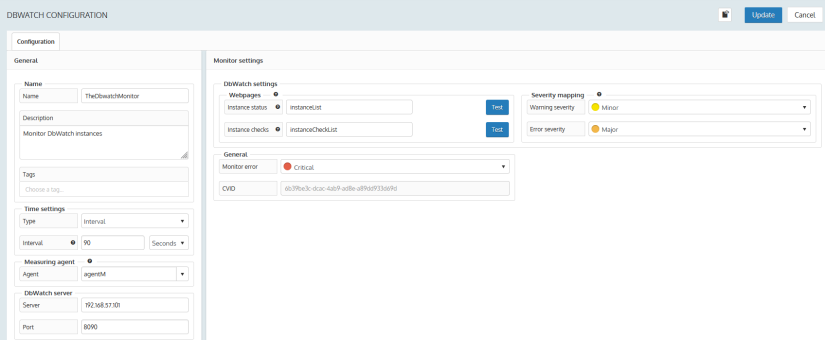
The Dbwatch monitor will create an asset group, with the same name as the monitor, and populate the group with all of the database servers
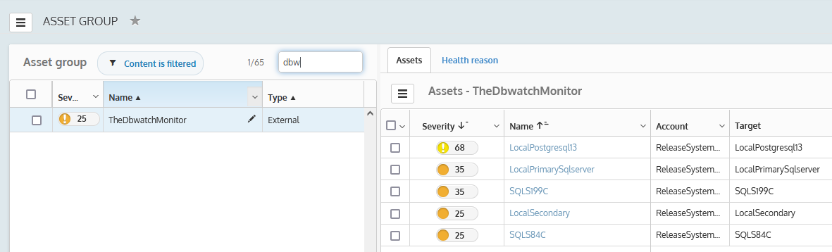
Configuring the Ceeview Dbwatch monitor
General settings
This section covers common settings like name, scheduling etc.
| Section | Setting | Description |
|---|---|---|
| Name | Standard identification of monitor | |
| Name | Name | |
| Description | Description of monitor | |
| Tags | User tags for the monitor | |
| Time | How monitor will be scheduled for execution | |
| Type | Either interval or schedule | |
| Interval/RRule | Detailed interval or schedule information | |
| Measuring agent | The agent settings controls from where the script will run. | |
| Agent | The chosen agent must have network connectivity to the container environment. | |
| Dbwatch server | Connection information for Dbwatch | |
| Server | Dns name or ip address for the server hosting Dbwatch | |
| Port | Dbwatch's port number, default 8090 |
The beta version of the monitor does not have a configuration UI, so all configuration must be done using groovy scripting.
Monitor settings
This section covers how to map Dbwatch information to Ceeview health index and reasons
| Section | Setting | Description |
|---|---|---|
| Dbwatch & webpages | The webpage extension combined with Dbwatch connection information gives the url queried for Dbwatch status and checks | |
| Instance status | Provides overview status for each server. Use the Test button to verify connectivity. | |
| Instance checks | Provides all alarms for each server. Use the Test button to verify connectivity. | |
| Dbwatch & severity mapping | Dbwatch has three severities; info/clear, warning and error. These settings controls how to map severities from Dbwatch to Ceeview | |
| Warning severity | Dbwatch's warnings map default to minor health severity | |
| Error severity | Dbwatch's errors map default to critical health severity | |
| General | ||
| Monitor error | Severity of alerts related to errors in monitor configuration | |
| CVID | Internal identifier for the monitor, primarily used for advanced troubleshooting |
Configuring dbWatch server
Dbwatch server is a tool for monitoring and management of database server. Install the dbWatch server if not already installed, installation and configuration documentation is available at www.dbwatch.com.
Configure dbWatch to share alarm information
Use the DbWatch Monitor desktop app to connect to the DbWatch Server
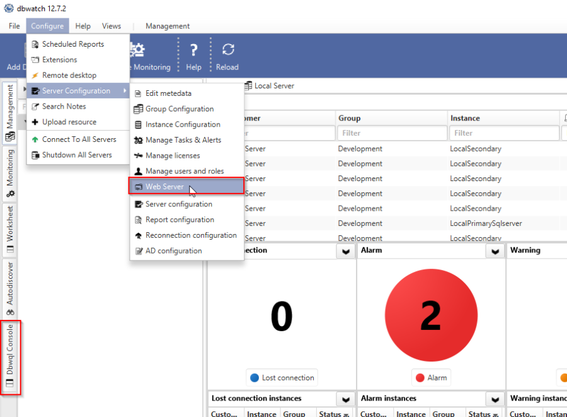
You can now either create the required web pages directly using Configure/ServerConfiguration/WebServer or indirectly using the DbwsqlConsole to write the required queries and publish them as web pages.
We'll use the latter approach in this example as it also provides an opportunity to test the queries before deploying them as web pages.
First enter the query to retrieve all database instances (servers) and their status (the query instanceList)
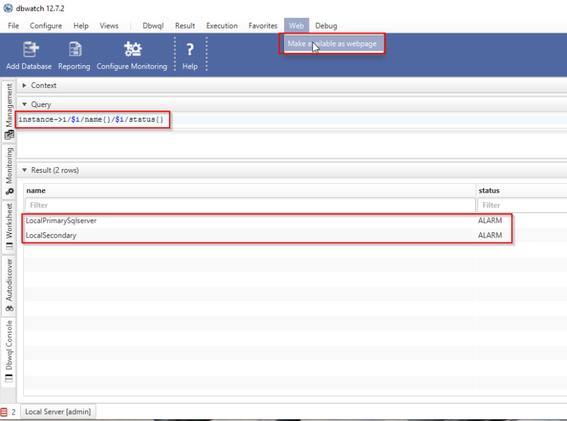
The result frame should show all database instances.
Next use Web/MakeAvailableAsWebpage to create the webpage using the current dbwql query, enter desired name for the page, we use instanceList in this example.
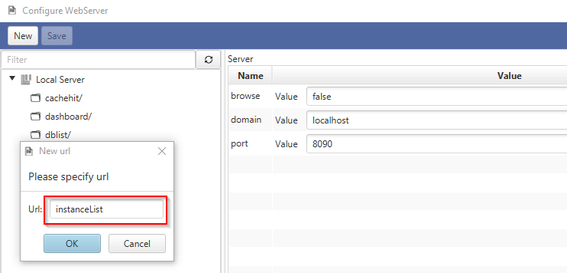
Finally click Save to save the webpage configuration
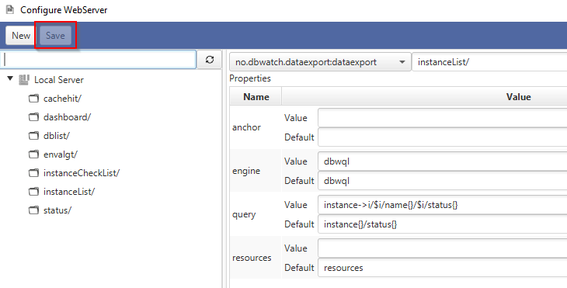
Perform the same steps for the instanceCheckList query in order to complete the configuration of DbWatch wrt providing alarms using web pages.
Testing dbWatch web pages
You should now be able to test the web page, please note that urls are case-sensitive
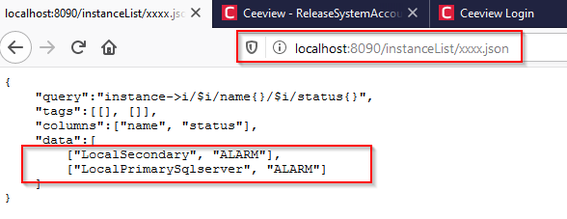
The final part of the url, xxxx.json, controls the format of the returned data
- .json gives json text
- .html gives html format
- .csv gives comma separated fil
The name, "xxxx", has no real meaning; it is just a requirement to have a string in front of the postfix.
Dbwql queries
- instanceList: instance->i/$i/name{}/$i/status{}
- instanceCheckList: instance->i/task[tasktype='alert' & enabled !='YES' & status !='OK']->c/$i/name{"instanceName"}/$i/status{"instanceStatus"}/$c/name{"checkName"}/$c/details{"checkMessage"}/$c/status{"checkStatus"}?