

2.14 release notes
Table of contents
General notes
| # | Description |
|---|---|
| 1 | We highly recommend our customers running older versions of Ceeview to upgrade. If you need assistance with upgrading, please contact our support department and we will assist. Email: support@ceeview.com or phone: +47 24 07 72 00 |
| 2 | Downloading Ceeview rel. 2.14 Required files to upgrade/install Ceeview 2.14 are made available on our ftp site. Contact Ceeview Support for login details. |
| 3 | End-of-Support Announcement: “Notification policy”. As earlier informed (Ceeview 2.10 ReleaseNotes onward), release 2.12 was the last version of Ceeview providing full support for “Notification policy” for sending notifications via email, SMS, etc, and any use of "Notification Policy" should be migrated to "Action triggers". "Action triggers" was introduced in Ceeview 2.5 and provides superior functionality compared to “Notification policy”. While legacy “Notification policy” will for the most part work as before in 2.14, it will be fully removed in Ceeview 2.15. |
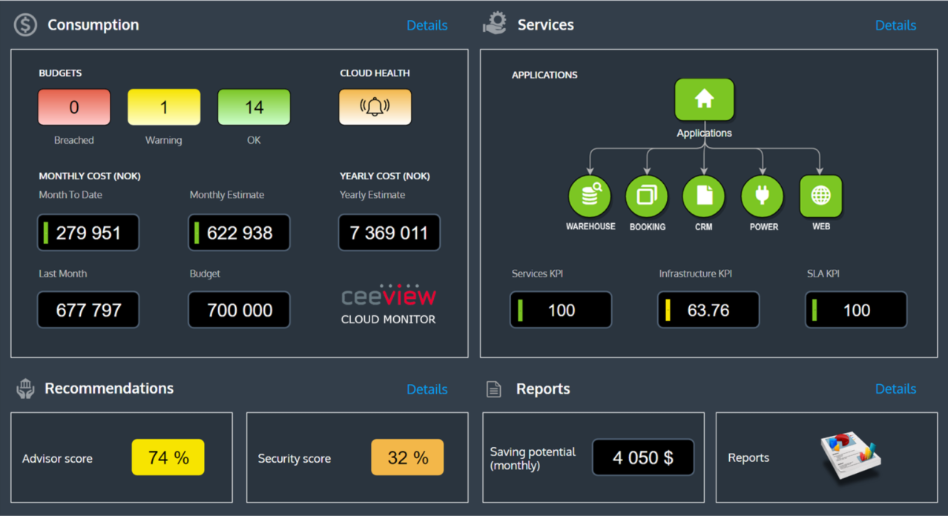
| 4 | Cloud Cost Monitor Insightful view of Cloud Cost and Resource Utilization for Management and Customers.
|
5 CV-10778 | Removed ServiceWarning and ServiceQualifierWarning The two events ServiceWarning and ServiceQualifierWarning is removed in Ceeview 2.14. In order to identify the service or qualifier warning events please use severity=Major together with either type Service or ServiceQualifier as described below. Required steps to migrate action triggers using service or service qualifier warning events: Change any action trigger using event ServiceWarning as follows set Type=Service and Severity=Major Change any action trigger using event ServiceQualifierWarning as follows: set Type=ServiceQualifier and Severity=Major |
6 CV-8955 | Support for Docker monitoring Monitors/Containers - new monitor supporting monitoring of Docker containers |
7 CV-10229 | Documentation Online documentation - all documentation for monitors and service qualifiers have now been moved to docs.ceeview.com and is still available using the documentation icon in each monitir/qualifier dialog. For full documentation use the url docs.ceeview.com and select the correct version of Ceeview in the lhs menu. |
8 CV-8267 | Powershell Monitor Added a new Powershell monitor which executes a powershell script on the specified asset or asset group. Note: the monitor will only execute the script on assets which are of the type agent. |
Features
| # | Description |
|---|---|
| CV-9949 | Log monitor now supports:
|
| CV-9968 | Administration/LDAP - improved control of synchronization of Ldap users. |
| CV-7169 | Integration - improved support support for 3rd party reporting tools wrt presenting Ceeview metric series and associated attributes. Please see Reporting for details. |
| CV-10217 | Added option in agent installer and silent installer to disable timezone information when installing on a agent which have no internet access |
| CV-9166 | General: Added minimize/maximize feature to the following details view:Application, KPI and Automation. You can now min and max the configuration panel for better visibility of the GUI. |
| CV-9813 | Ceeview/Access - it is now possible to access the Ceeview application without appending the url with /ceeview after hostname. I.e. where you previosly had to use url "https://myserver/ceeview" you can now use "https://myserver" |
| CV-9110 | Added possibililty to add informational info to one ore more services directly from the service grid through the Service menu. |
| CV-10445 | Added separate Attachment maintenance for handling retention of attachments stored in ..\data\attachments. Previously these attachments were handled by the Notification maintenance job. |
| CV-10460 | Administration/User/Grid: Added active user and action trigger (Active) column. |
| CV-3050 | Notification - added Slack Notification Channel. |
| CV-9252 | General/Profile: Added profile icon to header and on click go directly profile. |
| CV-9253 | Service/Details: Add edit symbol to header of service preview for easy edit access. |
| CV-9285 | Dashboard/Widget/Metric: Added table widget to display a metric serie. |
| CV-10543 | General/Grid: Added Content is filtered info message to all grids. On click we clear filters. |
Enhancements
| # | Description |
|---|---|
| CV-8617 | ServiceDetails - the dailog now shows number of services linked into current service. |
| CV-8762 | Monitor XenServer - now support filtering of guest systems by XenCenter groups and tags. |
| CV-9083 | Dashboard: Asset/AssetState widgets supports filtering by asset. |
| CV-9584 | Monitors/Logmon - it is now possible to set the target asset based on logmon variables. |
| CV-9590 | Previously all similar monitors on an agent ran with the same interval, for instance all system monitors on a monitor ran with same interval. This has been changed in Ceeview 2.14 so that each monitor can be configured with individual intervals. Currently Logmon, Dbwatch and Script monitors support individual intervals and remaining monitors will be updated correspondingly in upcoming releases. |
| CV-10190 | Incidents - improved create of incidents from notification/action-triggers. |
| CV-10568 | General/Grids - all grids now include play/pause for real-time event driven updates |
| CV-10576 | Service/Details/Dependent services tab: Added tab in service details that list dependent services. This refers to other services where current services is used as a link object in their servicemodels. |
| CV-8882 | Application: Expanded assetgroups not support custom resizing to show more or less assets. |
| CV-10121 | Dashboard/Shapes: Added search for shapes. |
| CV-9411 | Dashboard: Convert now converts a legacy Serviceboard to Dashboard. |
| CV-9957 | Viewer/Service: Added menu and selector column to servicelog grid so it has the same options as servicelog tab |
| CV-10276 | CeeviewServer/Postgresql - metric table is now created partitioned by installation of server. |
| CV-9589 | Monitor/Logmon - the monitor now support various character encodings for the logfile. Note that UTF16 is an implementation of the UCS-2 standard. |
| CV-10186 | Auditing - added audit for action triggers (team and user) - initially it is enough to provide information (time, by who) that profile/ruleset has been changed. |
| CV-10572 | Reports/Events - it is now possible to control if to include action log in report as well as several improvements wrt how to filter which events should be included in report. |
| CV-10384 | Service/Viewer: Fixed an issue where scrolling overflowed top header. |
| CV-10387 | Service/Viewer: Added feature to persist zoom setting in viewer per service per user. |
| CV-10498 | Monitor processes - improved control over alarm text, the text now uses the user editable field representing process name. |
| CV-7319 | AssetDetails/Metrics - added mouseover for the Metric grid's State column. |
| CV-8332 | Reports: Added option to clone reports to multiple accounts. |
| CV-9325 | Infrastructure: Added redirect to Eventsummary on click of HI pills in asset, assetgroup and monitor grids. The redirect display the events for the given asset/assetgroup or monitor. |
| CV-10066 | Monitor: Added click action when clicking HI pillbox in monitor grids. Ceeview now opens the events for the clicked entry. |
| CV-10123 | Service/details/servicelog: Link icon for service link now redirect into the given service view. |
| CV-10185 | Report: Duplicate a report now have the option to select account for the copy. |
| CV-10213 | Application/Details: Added click action for HI panel in details. On click we now display the corresponding reasons in the reason grid. |
| CV-10358 | Assetgroup: Modified clickbehaviour, to edit the group you now have to click the pencil in the name column or the header name in the asset grid on the right side. This will hopefully reduce the misclicks in order to see the asset of a given group, instead of being redirected into the group configuration. |
| CV-10462 | Administration/Team/Grid: Add action trigger (Active) column. |
Fixes
| # | Description |
|---|---|
| CV-9312 | Out of memory exceptions on an agent will be detected and the agent will be put in a warning state indicating that that memory settings needs to to be changed. |
| CV-10330 | Dashboard/Shapes:Modified default redirect for shapes with service element as datasource. We now redirect directly into the service view and highlight the given element. |
| CV-8752 | Infrastructure\Filter: New column Filtered now displays last time the filter caused a reason to be removed. |
| CV-10238 | Monitors/Url - various bugfixes including fixed issue where profile could not be created after a previous create profile had been cancelled. |
| CV-7223 | Monitor/Snmp - various bugfixes including correct filtering for templates and improved handling of invalid mibs files. |
| CV-9684 | SLA/Details: Fixed an issue where zooming in history did not display any root causes. |
| CV-9994 | EventSummary - removed type ServiceMOdel as it is no longer used, use Service instead. |
| CV-10419 | Emailgtw: Added option to set suppresion on the keys added in the filter. |
| CV-9075 | Application: Fixed a bug where team was not set on create. |
| CV-9795 | Grids: Replaced custom time selector with a more userfriendly component. |
| CV-10078 | Monitor/Eaton: minor improvements. authentications are now filtered on correct type. Warning if not able to connect to device is now persisted. Removed dirty check warning when it was not needed. |